Sunday, 5 July 2015

Game # 11 : Centipede

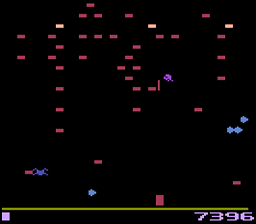
So, the next game is Centipede. For a change (and because I dropped Pitfall off the list), I'm going to copy the Atari 2600/VCS version of Centipede.

This has the added advantage that my inability to draw, well, anything, doesn't show up too much. Even I can draw a square and fill it in :)

Just.

The first 80x86 Assembler program I wrote was an emulator for the Atari 2600, which is roughly akin to learning to swim by jumping into the middle of the Channel ....... I wrote it in annoyance because the then typical hardware (80386-25 ish) couldn't cope with Stella.

Game#10 Match 3 Completed

Match 3 is completed and can be played here.

The game core hasn't changed much but I've added a swipe left/right type selection screen. There are only four different layouts which are used with increasing difficulty levels, but it would be easy enough to add more in.

As always the source is in Github. One thing about this code is there are very few globals. Only things that actually need to be globals ; other variables are stored in singleton objects like "SelectCtrl".

Selection

Event 1 avoids copyright and requests the key (one value, the highest accessible level), which is processed in 7 and 8.  Events 3-6 create the shops you can see in the picture to the right, tracking the UIDs of first and last level.

The shops are updated on a per tick basis starting at 9. 10-14 move the shop towards a given "targetX" - this allows us to move the shops by just setting this value. Events 15-17 copy the size and positions and the cross visibility of each Selector (the shop). Effectively it responds immediately to changing variables. Event 18,19 and 20 handle taps on the shops, setting the level and running the game. Event 21 detects a touch end with swipe. Event 22/23 and 24/25 are very similar - the check is for direction, the first (or last) shop not being on the screen, and it not already being in motion. If this passses it sets the targetX value to move it.

Main Game

The game is driven by a state machine.

Setup

The primary purpose of setup is given a definition string specifying a level to create the initial display. It also contains the dropping code. Event 4 gets the string and decodes it into specific values. Event 5 takes the last part (defining the screen layout) and works out the level dimensions, and from that it works out how big each cell is and where they are. Events 6 and 7 create the grid where there is an "X" (e.g. event 9) and it also adds the grey behind tile. Where there isn't an "X" it creates a launcher, an object which spawns candies. Event 10 creates a row of blockers at the bottom of the grid. (If you disable comment 13 you will see these things in position, also see 2 posts back). Event 11 and 12 handles Launchers followed by Launchers or Blockers, replacing them with Blockers.

Event 14 onwards handles the dropping when the state is DROPPING. Firstly all the launchers are chosen (16) and if they do not already contain an item one is spawned (17). Event 18 access the items in backwards order up the screen, and if they are moving works out a new position (Event 19), If there is a collision with a stopper (blocker/launcher) or another item then the collision flag is set. In event 23, if there was a collision, the item is stopped and it is locked to a cell, otherwise Y is updated with the new position, moving it down the screen.

Events 26-29 cause the pulsing effect, and 30-33 is a function counting the number of items still moving that are in the game.

Matches

Matches is almost all code rather than events. It is a function that for each square counts the number of duplicates in a horizontal and vertical direction (right and down). Most of the work is done in 4, which calls two functions to scan in the directions and maintains the "best result" in each direction.

Event 6 counts the duplicate objects in a given direction. It keeps moving right (or down) whilst there is an object there in the game and the typeID (basically, the displayed graphic) is the same.

Control

Most of the work is here. We first go into NEWBLOCK state which is the start of a possible set of drops, this just resets the bonus multiplier and goes into DROPPING

DROPPING state starts at Event 5. The dropping is actually done in Setup, so 7,8,9 are just waiting for it to finish. Events 10 and 11 decide what to do next - if there is a match-3 (or ore) we go to REMOVE, otherwise we go to WAITSWAP. The first pass flag indicates the first pass, where you don't score, this is removing lines from the randomly selected items. If you watch the game it sort of "plays itself" for a few seconds creating a item grid with no Match-3s

REMOVING starts at 12. It basically picks H or V (horizontal or vertical) depending which is the best scoring, or randomly if they are the same, and then calls "destroyChunk" to delete them, having picked one match line that fits that (17,20) randomly (18,21). Effectively if there are (say) 3 vertical Matches it will pick on only. Each of these triggers an explosion, when these explosions have all finished (22) it goes back into DROPPING state to see if there are any more to process.

Events 24-29 are its helper function - it deletes n objects from x,y in direction dx,dy using a for loop. The exact behaviour depends on "first pass" - if not setting up it fires the explosions sequentially and adds to the score.

WAITSWAP is basically handling the selection and swapping over of adjacent cells. Standard Drag and Drop was deemed inadequate, so it is handled its own way. Initially, we go to EXIT (end of level) if there are no moves left.

Event 34 handles the "touch down". The calculations in the condition centre it on the middle of the Item (the collision area of the item is smaller than the bounding rectangle) and copies relevant information into a TouchManager object. Event 36 handles the drag part.

When we release in 37 (again with the centreing) we keep the drop target details (39) and if they are adjacent and not diagonal (40) we swap them over, otherwise we return the original item to its start place. Events 41,42 and 43 all deal with these tests failing, and just return the original item to its home point. These movements are handled by an ItemMover object whose responsibility it is to move an item to a position and then destroy itself - a bit like fade does.

When all the moves have finished and we swapped (44,45) we check to see if this has resulted in a Match 3, if so we start all the items moving again and go to NewBlock. If not (47) we return them to their original position.

Event 48 and 49 is a function which creates and sets up and ItemMover, and 50-52 use lerp to move it over time, 52 destroying it when it reaches the end position

Event 55 onwards is the exit state and is mostly graphic - all items explode, all tiles fade away, Layer 3 is made visible and a touch takes you back to the select screen, hopefully with "levelComplete" set - this is set when the score exceeds the target score in Event 29 when we are removing stuff.

Finally 62 is the big red button which abandons the level. You can still complete it.

Levels

I don't do much level design here, there are 4 of them (see event 3,4,5,6,7) which are concatenated with the number of discrete items that exist (6), a required score and maximum moves (all calculated in event 2). Effectively the layouts are used over and over again with harder target scores and more, but not quite enough moves.

Saturday, 4 July 2015

Match 3 , core complete

A little progress on Match 3 today. Not as much as I'd like, I spent a lot of time tracking down occasional "stops" where an item just didn't drop.

Turned out in the end that when it dropped it very occasionally collided with the one dropping immediately below, causing it to stop.

Basically the core now works - you can play a level through to the end, all that is left is to complete the front end and the "unlocking" of levels.

Friday, 3 July 2015

Match 3 continued ....

Actually doesn't look that different to yesterday but it's advanced quite a lot. The dropping code now has 'removal code' added (this has a state machine) and most of the dragging code added. To complete the game core all I really need is to do is to check the drop position is legal, swap them over, check that that creates a match, and undo it if it doesn't.

Scoring etc. can then be added, but that's not too difficult.

Ended up not using the drag and drop behaviour for this. The problem is that the collision box for the items is narrower than you might think, if not they get stuck coming down .... and it uses the same collision box for DnD. So there is an own-version of the DnD.

Also created an object whose purpose is to move one object to another position and then self destruct - a bit like Fade with moving. I might (not sure) be able to generalise this so it can move anything, at the moment it's just Item-class only, but this might require some tinkering. Not sure :)

Thursday, 2 July 2015

Game#10 : Match 3

This is a learning exercise, not an actual efficiency exercise. The picture of a Match 3 game just screams "2 Dimensional Array", but I have decided in a moment of advanced masochism to do it without arrays.

So I had some fun with this. The bright idea worked well - you can see the outline of the game, but the faded purple blocks and arrows are seeders and blockers for the pieces - this is implementing the 'falling down' bit, with the arrows pushing the out and the squares stopping them. These have had their invisibility setting code disabled so you can see them, obviously this won't show in the end bit. I also use a faint pink square on the screen which is the 'board space' and everything resizes to fit in that space (you can see a faint pink behind the arrows in the middle)

I originally did this with Physics, but I wasn't happy with that, then I did it with bullets, and I couldn't get it quite right. The movement is now hard coded (basic physics stuff) and it finally works, though I had some fun with spurious collisions and it took twice as long as I thought.

I'm going to think Frogger with this - that had some code which scanned looking for lines of log bits, and that can be tweaked to check for lines of food.

The little square box in the top right does say 555 (this is a technical joke), it's job is maintenance of semi globals, which belong to the Layout but aren't real globals - things like the position of the grid and so on. I just think that is neater than bazillions of globals.

Wednesday, 1 July 2015

Berzerk - how it works

Game and Title Events are fairly straightforward. The first is just a collection of includes, the second displays the title screen (see right) and functions in the same way as Asteroids.

Globals is mostly (err..) globals but does have a reset check - setting resetGame non zero starts a new game. This game restarts the layout when a life is lost or when the room changes.

MazeCreate is in many ways not dissimilar to the Pacman game, in that it tidies up the position, width and heights of the walls (events 7-11). The majority of the rest of the code implements the Berzerk pseudo random number generator explained here. This uses the room coordinates (x and y) to generate a random sequence which is predictable. The nested for conditions (3-6) set this up, and 4,5 and 6 adjust the position of the 'room middle bars' as extracted from the random seed (the "Set Wall to" in event 3)

Player handles the player code. Event 2 cancels firing - the animation and movement is disabled when the fire key is pressed. Events 3 to 11 manipulate an 8Direction behaviour in two ways, once to the set animation, and another to set the current direction, if any, in instance variables lastVectorX/Y so that the player knows which way to fire.

Event 12 handles actual firing, and 13-18 set the correct firing animation (it sort of "points a gun")

Event 19 handles the collision with 'non fatal walls' - these are not visible (there is one on each exit) and collision with this moves to another room. playerX/Y is the new direction (set in 20,21) and changeX/changeY set the direction of movement (event 20 and 21). Evemt 22 9 not wraps it, stops the game, movement, destroys everything except the frame and plays the audio (23 and 24) depending on whether there are any robots or not.

Event 25 handles scrolling - when you move, the current room 'scrolls off' and 25 to 26 does this, restarting the layout (next room) at the end.

Event 27  handles the bonus count (when you destroy all robots in a room) and this is done in the collision code. The rest are functions which update lives and score

Robots handles robots. The first thing we do is create them, one (possibly) in each of the 5 x 3 'quadrants' of the room, providing they aren't too close (1-5). There is a short delay before it starts - when it does (6,7,8) it starts moving, decides whether it is chasing horizontally or vertically and starts a timer which regularly flips the chase direction, and one for trying to fire.

Events 9 to 18 handle setups for the different robot types, which is dependent on the score, see strategywiki.org for what appears when.

Events 19 to 22 handle movement. It moves in the current direction (evaluateMove function works this out) and if it is overlapping a wall (the else in 21 is fired) it toggles the direction it is chasing in. Event 22 causes it to toggle randomly anyway.

Events 23 to 26 handle firing. Each robot keeps a count of how many it can fire total, and how many it has left. When it fires one, it decrements "bulletsLeft", but each bullet knows who fired it. When the bullet is destroyed the "bulletsLeft" value is incremented (in the colllision code). Event 24 works out the angle to the player, but the bullets only fire in diagonal or straight directions - the or in 25 checks this as "near enough" and the direction is ironed out to the nearest 45. Finally 26 doubles the speed if it is a fast shooting robot.

Event 27 is a function which works out which way the robot should move into the dx and dy instance variables, and sets the animation appropriately. It gets a Robot UID as a parameter.

Events 31-33 handle the infamous evil Otto. A timer to create him is set up in 31, He is created in 32 and the sine behaviour adjusted. This handles the vertical position automatically, but event 33 adjusts him horizontally with a simple chase, doubling the speed if there are no robots left.

Collisions handles (surprise...) The first 3 just stop all bullets against walls and other bullets. Events 4 and 5 allow RobotBullets to kill the player, and a robot (if it isn't the spawning robot). Event 6 allows player to kill robots, 7 and 8 stop collision with the wall or Otto, 9 allows Robots to blow up on collision with the players orrobots, and Event 10 fires if the robot hits a wall (which shouldn't happen !)

The consequences are dealt with in 11 on. Event 11 fires if the player dies, and spawns an explosion which for some reason fires in Event 17 (disorganised ....). Event 12 and 13 handle Robot Bullet destruction and the incrementing of "allowed bullets for this robot". Event 14-16 handle scoring for robot death, and the bonus (note Count = 1 because it still exists). Events 17-19 handle life lost at the end of the explosion(either go back to the title screen or restart the same layout)

Finally 20 starts the game off.

Berzerk (Released version)

Evil Otto is about to pounce.
So, Berzerk is complete and ready to run, and the github is up to date  (see the right).

I will add the 'write up' later on today (hopefully).

I have decided, as an aside, to do a Match-3 game next, as its a bit different, and added a couple of other games and sorted it a bit.

So the list is now.
  1. Squash (done)
  2. Pong (done)
  3. Breakout (done)
  4. Galaxians (done, no title screen)
  5. Asteroids (done)
  6. Jet Pac (done)
  7. Frogger (done)
  8. PacMan (done).
  9. Berzerk (done)
  10. Match 3 Game
  11. Centipede - yet another with a very odd movement behaviour.
  12. Robotron - another classic, a demented single screen shoot em up. 
  13. Some sort of RPG/Arcade simple game ; Atic Atac or that sort of thing.
  14. Defender - Robotron's "other half", with a scrolling screen.
  15. Lode Runner (once implemented this on a TI-83 calculator)